Radium Girls by Kate Moore is a documentation of the struggle of a group of girls who ended up changing American workforce laws a lot. The book follows the lives of girls who started with relatively normal lives, working in their early teenage years. However, these girls ended up being employed by the Radium Dial Company, who made glow in the dark watches using the newfound technology of radium. In the early 1900s, when radium was first discovered, it was considered the wonder drug and was used almost everywhere. However, as we now know, radium is highly radioactive and very dangerous.
These girls were given the very simple task of painting the watch face using the paint they mixed themselves, but there was a catch: there was a smidge of radium (which also happened to be very expensive at the time) in the paint. However, because they had to paint very thin strokes and the paintbrush bristles often spread out, they needed to wet the paintbrush. The employers initially gave them glasses of water to dip in but determined they were wasting too much radium, so they withdrew those glasses, leading to the required use of licking the brush to maintain the thin composition, thus leading to "lip, dip, paint" is the way that they created these watches.
As time passed, the girls slowly grew up and left the factory for better work, or because they got married, but they continued to have lasting effects from licking the radium. In fact, one girl ended up so sick that her mouth literally fell apart, with all her teeth and eventually the jaw completely coming out. In the beginning, many of these cases were written off as syphilis, because the symptoms were very similar, but the doctors were aware that this was something that they had never seen before. At some point, various doctors concluded that the radium had something to do with all of these symptoms.
Eventually, this leads to 5 girls, Grace Fryer, Edna Hussman, Katherine Schaub, Quinta McDonald, and Albina Larice to sue the Radium Dial Company, and this case, while starting out very slowly, gained traction with media and ignited widespread change throughout the US. This lawsuit triggered many labor standard laws and workforce safety laws, and in the end, the girls won the lawsuit, earning themselves about $150,000 dollars in today's money as well as a running income of $200 a week, plus all medical expenses covered.
Sunday, June 14, 2020

Saturday, July 28, 2018
What is a blue screen of death?
The blue screen of death - or BSOD - is caused when a Microsoft Windows machine encounters a critical error that it cannot fix; this is usually caused by low-level software or faulty hardware.
Blue screens are generally caused by problems with your computer’s hardware or issues with its hardware driver software. Sometimes, they can be caused by issues with low-level software running in the Windows kernel. Regular apps usually won’t be able to cause blue screens. If an app crashes, it will do so without taking the operating system out with it. A blue screen occurs when Windows encounters a “STOP Error.” This critical failure causes Windows to crash and stop working. The only thing Windows can do at that point is restart the PC. This can lead to data loss, as programs don’t have a chance to save their open data. When a blue screen occurs, Windows automatically creates a “minidump” file that contains information about the crash and saves it to your disk. You can view information about these minidumps to help identify the cause of the blue screen.
What does a Blue Screen of Death Look Like?
In Windows 7 and before, the Blue Screen of Death was a very convoluted page, with lots of technical words.

In Windows 8 and 10, the Blue Screen of Death is much simpler.

What can you do if you start experiencing BSOD's?
If you have trouble locating good advice for solving your problem, don’t worry. BSODs can have a variety of root causes. Here are some additional tips that might help you deal with many blue screens:
What Causes the Blue Screen of Death?
What does a Blue Screen of Death Look Like?
In Windows 7 and before, the Blue Screen of Death was a very convoluted page, with lots of technical words.
In Windows 8 and 10, the Blue Screen of Death is much simpler.
What can you do if you start experiencing BSOD's?
If you have trouble locating good advice for solving your problem, don’t worry. BSODs can have a variety of root causes. Here are some additional tips that might help you deal with many blue screens:
- Use System Restore: If your system just started blue screening, it may be a software issue. You should use System Restore to try to fix the problem. If this works, then you know it is a software issue.
- Scan for Malware: Sometimes, malware can cause system instability. You should regularly scan your computer for malware to make sure that the malicious software isn't crashing your computer
- Install Updated Drivers: An old driver, a falsely installed driver, and a buggy driver could be a cause for BSODs. Make sure you have the latest drivers and install them correctly
- Boot into Safe Mode: If your computer blue-screens every time you turn it on, try booting it into safe mode. When you boot it into safe mode, windows only uses the essential drivers and from there, you can further troubleshoot your problem
- Check for Hardware Problems: Another cause for BSODs is faulty hardware. Make sure you test your computer's memories for errors and checking your computer's temperature to make sure it isn't overheating. Additionally, you could hire a pro to check other parts that may have gone bad.
- Reinstall Windows: Your very last option could be to do a clean install of windows. This will completely remove your existing software and replace it with a new one. If your computer continues to blue screen after that, then it is a hardware problem
Saturday, April 7, 2018
Tech Tip #4
Hey guys, it's Achintya back again with another helpful tech tip for everyone. This one is to practice touch typing. Touch typing can improve your typing speeds very quickly. I have noticed many people do not know how to touch type and cannot type as fast as I can. There are many free sites that can help you, and when you learn how to touch type, you will be much faster.
Monday, March 26, 2018
Life After Humans Pt. 1
Human neglect affects the world's skies and aeronautic icons, including Air Force One, the Theme Building and a control tower at Los Angeles International Airport, the Spirit of St. Louis in the National Air and Space Museum in Washington, D.C., and the KVLY-TV mast in North Dakota. Elsewhere, Rocky Mountain locusts invade the cities in the Midwest, Mount Everest's ice preserves artifacts left by climbers and even the bodies of climbers who died on its summit, and the migratory patterns of birds and even the weather are affected by the absence of humankind patrolling the skies. Solar-powered radio station KTAO continues broadcasting long after humans are gone. The Cassini space probe crash-lands on Saturn's moon Enceladus, leading to extremophile bacteria from Earth that had been present inside the probe colonizing its possible water ocean and possibly causing life to evolve on it. The episode also visits Edgar, Ontario, a Cold War radar site which was abandoned in 1999, and the aging Berlin Tempelhof Airport in Germany which was closed in 2008.
Wednesday, March 14, 2018
Pi Day
Pi represents the ratio of a circle’s circumference to its diameter. It’s an important part of the foundation of mathematics, most importantly geometry, where pi is key to equations calculating the area of a circle, A = πr2, and the volume of a cylinder, V = πr2h. Pi day is on 3/14 because the number pi starts with 3.14.
Pi(π): 3.141592653589793238462643383279502884197169399375105820974944592307816406286208998628034825342117067982148086513282306647093844609550582231725359408128481117450284102701938521105559644622948954930381964428810975665933446128475648233786783165271201909145648566923460348610454326648213393607260249141273724587006606315588
Pi(π): 3.141592653589793238462643383279502884197169399375105820974944592307816406286208998628034825342117067982148086513282306647093844609550582231725359408128481117450284102701938521105559644622948954930381964428810975665933446128475648233786783165271201909145648566923460348610454326648213393607260249141273724587006606315588
Tuesday, March 13, 2018
Tech Tip #3
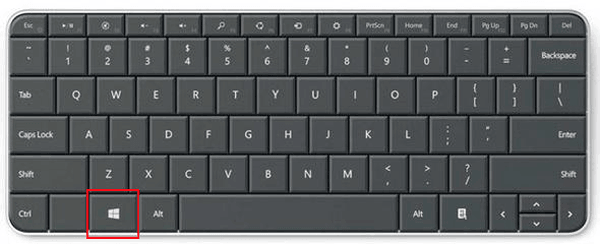
Hey guys, it's Achintya back with tech tip #3. Today's tip concerns only windows users. (Sorry Apple) You can use windows shortcuts in a variety of ways to help cut down the amount of time you waste, and this can allow you to use less mouse and more keyboard. Use Window + R to open the run menu. You can use Window + E to open up Microsoft Explorer, and you can use Window + M to minimize all tabs.

 |
Sunday, March 11, 2018
The Brain
The Brain
What is the Brain? What does it do? How do we know? Get all the answers right here in Achintya's informational blog. The brain is an organ, and without it, now human could survive. Without the brain you can't eat, think. learn, or create. Subconsciously, your brain is making sure every muscle and organ is doing its job. The nervous system relays information to and from the brain so everything else in the body does its job correctly. Many scientists call the brain "the most complicated thing in the universe".
The brain has 12 basic parts. Let's start numbering the 12 parts.
- Skull- The skull offers protection from most things. There are many bones in the skull.
- Cerebral Cortex- This part of the brain does many things. Most important, it helps you remember basic stuff like making sense of your surroundings, think and speak
- Anterior Cingulate Gyrus- This part of the brain that controls blood pressure and heart rate and plays a part in keeping your emotions in check
- Thalamus- The master of the senses(it controls all senses)
- Parietal Lobe- This helps you make sense or numbers, words, and maps
- Hypothalamus- Controller of your body's temperature, hunger, thirst, and sleepiness.
- Frontal lobe- Associated with character and personality. Helps you make decisions.
- Olfactory Bulb- processes sense of smell; gives you a sense of smell
- Cerebrospinal Fluid- Your brain floats in this liquid, the liquid protecting the brain
- Hippocampus- this is where memory lives
- Cerebellum- helps you balance and have coordination over the movement
- Brain Stem- messages between your brain and body are sent in the brain stem. It makes sure all your organs are working properly.
Conscious brains, on the other hand, do everything else. They make sure that you are writing properly, reading properly, and etc. They help you focus on math, finish a science experiment, and get your homework done. They make sure that you listen and pay attention. They make sure your food goes in your mouth. You should get the idea by now. They do literally everything else for us.
What happens to your brain when you go to sleep? First of all, lets tell how much sleep you should get. Are you a newborn? Then you should be getting 15-16 hours of sleep. Infants get 14-15 hours of sleep. Toddlers should get 12-14 hours of sleep. Children should get 10-11 hours of sleep. Teens should get 8.5-9.25 hours of sleep. Adults should get 7-9 hours of sleep. When in sleep, your brain enters a subconscious state, making you less aware of your surroundings. The reasons you have dreams is because REM combined with the brain that are linked with imagination, creativity, and anxiety are active. You rarely remember dreams because when you sleep, your brain's storage is off.

Subscribe to:
Posts (Atom)